
Download Fermat – KI‑Fashion‑Design‑Tool, kostenlos, sicher, kollaborativ
Übersicht über Fermat: KI‑gestütztes Modedesign
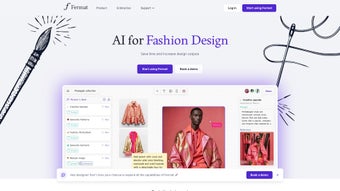
Fermat verändert die Art und Weise, wie Modeprofis Ideen zum Leben erwecken. Als web‑basiertes kollaboratives Whiteboard ermöglicht diese KI‑gesteuerte Plattform Designern, grobe Skizzen mit einem Klick in polierte, hochauflösende Visualisierungen zu verwandeln. Egal, ob Sie ein einzelner Freelancer, ein kleines Studio oder ein Unternehmen‑Level Designhaus sind, Fermat bietet einen flexiblen Arbeitsbereich, in dem Farben, Materialien und Stile sofort angepasst werden können und Outfits auf einer Vielzahl von Modell‑Avataren visualisiert werden. Das Kernversprechen des Tools ist Geschwindigkeit, ohne die Kreativität zu opfern: Durch die Automatisierung repetitiver visueller Aufgaben können Designer sich auf Konzeptentwicklung, Trendprognosen und Storytelling konzentrieren.
Zusätzlich zum Kern‑Design‑Engine bietet Fermat eine Bibliothek von KI‑gestützten Vorlagen, Textur‑Paketen und Workflow‑Anpassungen, die sich an die einzigartigen Pipelines von Modehäusern anpassen. Die Plattform unterstützt zudem unbegrenzt Teammitglieder, was sie ideal für Echtzeit‑Brainstorming‑Sitzungen, Kundenpräsentationen und abteilungsübergreifende Reviews macht. Mit gestuften Preisplänen, die von einer kostenlosen Starter‑Option bis zu voll ausgestatteten Enterprise‑Abonnements reichen, positioniert sich Fermat als zugängliche, aber leistungsstarke Ressource, die hochkarätige Modevisualisierung für jeden mit Internetverbindung demokratisiert. Der Fokus auf sichere Cloud‑Speicherung, regelmäßige Updates und nahtlose Integration mit bestehenden Design‑Tools stellt sicher, dass Kreative die Plattform mit sensiblen Design‑Assets vertrauen können, während sie an der Spitze der KI‑Innovation bleiben.
Fermats Integrationsfähigkeiten erstrecken sich auf beliebte Design‑Suites wie Adobe Creative Cloud, CLO 3D und SketchUp, sodass Nutzer Assets importieren/exportieren können, ohne ihre bevorzugte Umgebung zu verlassen. Die Plattform unterstützt zudem API‑Zugriff für größere Marken, die KI‑Rendering direkt in interne Product‑Lifecycle‑Management‑Systeme einbetten müssen. Von frühen Konzept‑Skizzen bis zu finalen Lookbook‑Spreadings rationalisiert Fermat den gesamten visuellen Workflow und reduziert die typische Durchlaufzeit von Tagen auf Minuten. Für Modepädagogen bietet die kostenlose Stufe eine risikofreie Sandbox, in der Studierende mit KI‑unterstütztem Design experimentieren können, während Enterprise‑Kunden von erweiterten Sicherheitsfunktionen, privaten Cloud‑Bereitstellungsoptionen und dediziertem Account‑Management profitieren. Insgesamt ist Fermat mehr als ein Tool – es ist ein kollaboratives Ökosystem, das Kreativität, Technologie und Geschäftseffizienz in der modernen Modeindustrie verbindet.
Hauptfunktionen und KI‑gesteuerte Fähigkeiten
- Instant Sketch to Render: Upload a hand‑drawn sketch and let Fermat’s AI generate a photorealistic garment rendering in seconds.
- Dynamic Color & Material Swaps: Change fabric hues, textures, and finishes on the fly without re‑modeling.
- Model Diversity: Visualize designs on a wide range of body types, ethnicities, and poses to ensure inclusivity.
- High‑Resolution Upscaling: Export designs at 4K or higher for print‑ready lookbooks and marketing materials.
- AI Templates & Mood Boards: Access curated style templates that auto‑populate with trending colors and patterns.
- Collaborative Workspace: Invite unlimited teammates, comment in real time, and lock versions for approval workflows.
- Custom Workflow Automation: Set up triggers that automatically generate fabric specifications or BOMs after a design is finalized.
- Secure Cloud Storage: All assets are encrypted at rest and in transit, meeting industry‑standard data protection.
- Cross‑Platform Access: Use Fermat on any modern browser across Windows, macOS, Android, and iOS devices.
- Regular AI Model Updates: Benefit from continuous improvements in texture realism and style accuracy.
Diese Funktionen sind nicht nur eine Checkliste; sie stellen eine Workflow‑Revolution dar. Zum Beispiel eliminiert die Sofort‑Sketch‑zu‑Render‑Funktion die Notwendigkeit separater 3D‑Modellierungssoftware und reduziert die Zeit von Konzept bis Kundenpräsentation drastisch. Die dynamischen Farb‑ und Materialwechsel ermöglichen Designern, innerhalb einer einzigen Sitzung Dutzende Stoffkombinationen zu testen und fördern so eine iterativ‑experimentelle Designkultur. Darüber hinaus sorgt der kollaborative Arbeitsbereich dafür, dass Feedback‑Schleifen verkürzt werden – Teammitglieder können direkt am Bild kommentieren, was den E‑Mail‑Verkehr reduziert und die kreative Dynamik aufrechterhält.
Die KI‑Vorlagen, die auf einer ständig aktualisierten Datenbank von Laufsteg‑Trends basieren, helfen Designern, der Kurve voraus zu sein, ohne Stunden in Trendforschung zu investieren. Designer können zudem die benutzerdefinierte Workflow‑Automatisierung nutzen, um detaillierte Spezifikationsblätter zu erzeugen, was manuelle Dateneingaben reduziert und Fehler minimiert. Die sichere Cloud‑Speicherung wird durch Ende‑zu‑Ende‑Verschlüsselung und die Einhaltung von GDPR und CCPA unterstützt, was Marken, die proprietäre Designs handhaben, beruhigt. Schließlich garantieren die regelmäßigen KI‑Modell‑Updates, dass Textur‑Treue, Licht‑Realismus und Stil‑Erkennung im Laufe der Zeit besser werden, sodass die Plattform umso intelligenter wird, je länger man sie nutzt. Zusammen bilden diese Fähigkeiten ein kohärentes Ökosystem, das sowohl die künstlerische als auch die geschäftliche Seite des Modedesigns unterstützt.
Installation, Nutzung & Kompatibilität
Da Fermat eine cloud‑native Lösung ist, gibt es keinen traditionellen Installationsprozess. Nutzer benötigen lediglich einen modernen Web‑Browser (Chrome, Edge, Firefox oder Safari) und eine Internetverbindung. Um loszulegen, besuchen Sie die offizielle Fermat‑Website, klicken Sie auf den „Sign Up“-Button und wählen Sie entweder den kostenlosen Starter‑Plan oder einen kostenpflichtigen Tarif, der den Bedürfnissen Ihres Teams entspricht. Nach der Kontoerstellung können Sie sofort auf Ihr persönliches Dashboard zugreifen, wo Sie einen „Create New Workspace“-Button finden. Ein Klick startet das KI‑Whiteboard, in dem Sie Skizzen‑Dateien per Drag‑and‑Drop hinzufügen, ein neues Design von Grund auf starten oder die Vorlagenbibliothek erkunden können.
Step‑by‑step guide:
- Navigate to fermat.ai and register using your email or social login.
- Verify your email address through the confirmation link.
- Log in and select “Create Workspace”. Name your project and set access permissions (public, team‑only, or private).
- Upload a sketch (JPG, PNG, or PDF) or start a blank canvas.
- Choose “AI Generate” to convert the sketch into a high‑quality render.
- Utilize the side panel to adjust colors, fabrics, and model attributes.
- When satisfied, click “Export” to download the design in PNG, JPEG, or SVG formats, or share a live link with stakeholders.
- Optional: Connect your Adobe Creative Cloud account to sync assets directly into Photoshop or Illustrator.
- Optional: Enable webhook notifications to alert your PLM system when a design reaches “final” status.
Compatibility: Because Fermat runs entirely in the browser, it works on Windows 10/11, macOS Ventura and later, Linux distributions with a supported browser, as well as mobile platforms like Android 9+ and iOS 13+. The responsive UI adapts to tablet screens, making it convenient for designers who prefer sketching on iPad Pro or Surface devices.
Security is baked into the platform: all communications use HTTPS, and user data is stored in encrypted cloud containers compliant with GDPR and CCPA. For teams requiring on‑premise solutions, Fermat offers an enterprise‑grade private cloud deployment that can be hosted within corporate firewalls, ensuring data never leaves the organization’s controlled environment. Regular updates are pushed automatically, meaning you always have access to the latest AI models and feature enhancements without manual patches. If you encounter connectivity issues, a quick browser cache clear or switching to a wired connection usually resolves latency problems. For power users, a browser extension is available that adds shortcuts for one‑click exports and version control.
Pros, Cons & Frequently Asked Questions
Below is a balanced look at Fermat’s strengths and areas where users may need to plan ahead. The pros highlight the most celebrated aspects, while the cons point out practical considerations that can affect adoption. Understanding both sides helps you decide if Fermat aligns with your workflow and technical environment.
Pros
- Rapid conversion of sketches to photorealistic renders saves time.
- AI‑driven color and material swaps enable endless experimentation.
- Unlimited collaborative members foster real‑time feedback.
- High‑resolution export suitable for print and digital marketing.
- Cross‑platform browser access eliminates OS restrictions.
- Secure cloud storage with enterprise‑grade encryption.
- Regular AI updates keep the tool on the cutting edge of fashion tech.
- Extensive template library accelerates trend‑based design work.
- API and webhook support enable integration with PLM and DAM systems.
- Free starter tier lowers the barrier for students and independent creators.
Cons
- Requires a stable internet connection; offline work is limited.
- Advanced AI features may have a learning curve for traditional designers.
- Free tier includes watermarked exports and limited storage.
- Performance can vary on older hardware or low‑end mobile devices.
- Pricing for enterprise plans is not publicly listed and requires a quote.
- Some users report occasional latency during peak rendering times.
- Custom private‑cloud deployment involves additional setup time and cost.
FAQ (itemscope itemtype="https://schema.org/FAQPage")
Can I use Fermat on a mobile device?
Yes, Fermat’s responsive web app works on Android and iOS browsers, allowing you to sketch, edit, and collaborate directly from smartphones or tablets.
Is there a free version of Fermat?
Fermat offers a free starter plan that includes basic AI rendering, limited storage, and watermarked exports. It’s ideal for students or solo designers who want to test the platform.
How does Fermat handle design security and IP protection?
All files are encrypted both in transit (TLS) and at rest. Enterprise users can opt for private cloud hosting to keep assets within their own network, ensuring full control over intellectual property.
Can I export designs in vector format for pattern making?
Yes, Fermat supports SVG export, which can be imported into vector‑based pattern‑making software such as Adobe Illustrator or CorelDRAW.
What kind of support does Fermat provide?
Users have access to a knowledge base, community forum, and 24/7 chat support for paid plans. Free users receive email support with a standard response time of 48 hours.
Does Fermat integrate with existing design tools?
Fermat offers direct integrations with Adobe Creative Cloud, CLO 3D, and SketchUp, as well as API endpoints for custom workflow connections.
Can I set up automated export or notification rules?
Yes, the platform’s custom workflow automation lets you create triggers that automatically export files, generate BOMs, or send Slack/Teams notifications when a design reaches a specific stage.
Conclusion & Call to Action
Fermat represents a significant leap forward for fashion designers seeking to blend creativity with cutting‑edge technology. By turning sketches into high‑resolution, AI‑enhanced visuals in moments, the platform eliminates bottlenecks that have long plagued the design‑to‑production pipeline. Its collaborative environment, extensive template library, and secure cloud infrastructure make it a versatile solution for everyone from independent creators to multinational apparel brands. While a stable internet connection and a modest learning curve are required, the payoff in speed, flexibility, and visual fidelity is substantial. Whether you’re looking to prototype a runway collection, generate marketing assets, or streamline team feedback, Fermat equips you with the tools to accelerate every stage of the creative process.
Ready to experience the future of fashion design? Download Fermat today, start your free trial, and see how AI can transform your sketches into runway‑ready masterpieces. Elevate your workflow, impress clients, and stay ahead of trends—all from a single, secure web‑based workspace.
Fermat delivers a compelling blend of AI power and collaborative flexibility, making it a must‑try for modern fashion professionals. The only downside is the reliance on a stable internet connection, but the benefits far outweigh this limitation.



.png)



